Table of Contents
- Introduction
- The Extended Field Metadata Schema
- The Generic
CmsFormComponent - The Reference Picker Modal
- The Create and Edit Pages
- Results
- Conclusion
- What's Next?
Introduction
Note: This article is part of a series. The implementation shown here was built through vibe coding, and the complete source code is available in the Headless CMS Demo repository. For full transparency, I also used AI to help draft this article. However, the system architecture, design decisions, and trade-off analysis are my own, developed through brainstorming and iterative discussions with AI.
In Part 3 of the Headless CMS case study, we established a self-describing backend capable of serving any domain model's schema to the Next.js admin portal. The CmsTypeRegistry discovers all ItemModel subclasses at startup and the frontend dynamically renders navigation cards and tabular data listings.
But listing data is only one direction of the workflow. Administrators also need to create and edit those records. When an editor clicks "Create New" on a discovered entity, the frontend faces a harder problem than rendering a table: it must decide which kind of input control belongs to each field.
A product name deserves a text input. A product price deserves a number input. An isActive flag deserves a checkbox. A related article reference deserves a searchable modal with checkboxes. All of this must happen without the frontend containing a single line of code that knows what a Product, Article, or Event actually is.
This case study covers how we extend the metadata engine from Part 3 to power dynamic form generation and a reusable ReferencePickerModal for relational field selection.
The Extended Field Metadata Schema
In Part 3, the backend's unified metadata endpoint (/api/cms/items/{type}/metadata) exposed two arrays: columnShown (for table headers) and searchable (for search filter inputs). To support form generation, we extended the same endpoint's response payload with a third array: fields.
This fields array represents the complete schema of a domain entity, including information not relevant to tables or search filters:
{
  "code": "product",
  "displayName": "Product",
  "fields": [
    {
      "name": "name",
      "displayName": "Product Name",
      "type": "STRING",
      "required": true,
      "editableOnUpdate": true,
      "placeholder": "Enter product name..."
    },
    {
      "name": "price",
      "displayName": "Price",
      "type": "NUMBER",
      "required": true,
      "editableOnUpdate": true,
      "placeholder": "0.00"
    },
    {
      "name": "catalog",
      "displayName": "Catalog",
      "type": "REFERENCE",
      "required": true,
      "editableOnUpdate": false,
      "reference": "id.adiputera.demo.cms.entity.Catalog",
      "referenceCardinality": "SINGLE"
    }
  ]
}
Several field-level attributes shape how the frontend renders and validates inputs:
type: Maps to a UI control (STRING→ text input,TEXT→ textarea,NUMBER→ number input,BOOLEAN→ checkbox,REFERENCE→ reference picker button).required: Controls the HTML required attribute and validation messages for the form field.editableOnUpdate: Fields are assumed to be editable during creation. SettingeditableOnUpdate = falsemakes them create-only, causing the generated edit form to omit them entirely.reference: The fully qualified class name of the related entity, used to determine which entity type to search inside the reference picker.referenceCardinality:SINGLErenders a radio-button-style picker, whileMULTIPLErenders a checkbox-based multi-select.
The Generic CmsForm Component
There is only one form component in the entire administration UI. CmsForm accepts a type string, an optional initialData object, and a mode (create or update). It queries the metadata endpoint, builds the form from the returned fields array, and delegates submission back to the page layer.
sequenceDiagram
    autonumber
    actor Editor
    participant Page as Create/Edit Page
    participant Form as CmsForm
    participant API as CMS Backend

    Editor->>Page: Navigate to /cms/models/product/create
    Page->>Form: Render CmsForm with type="product" mode="create"
    Form->>API: GET /api/cms/items/product/metadata
    API-->>Form: Return fields[] schema

    Note over Form: Maps each field.type to an input control
    Form-->>Editor: Renders dynamic form

    Editor->>Form: Fills in values and submits
    Form->>Form: Serialize payload (extract IDs from reference objects)
    Form->>Page: onSubmit(payload)
    Page->>API: POST /api/cms/items/product
    API-->>Page: Return created CmsRowDTO
    Page->>Editor: Redirect to listing
Mapping Field Types to Input Controls
At the center of the CmsForm component is a field type renderer. The component iterates over the fields array returned by the metadata API and uses a conditional mapping to select the appropriate React input element for each type:
// CmsForm.tsx (Field Type Renderer)
{fields
  .filter((field) => mode === 'create' ? true : field.editableOnUpdate)
  .map((field) => {
  const isRequired = field.required;
  const isEditable = mode === 'create' ? true : field.editableOnUpdate;

  return (
    <div key={field.name} className="flex flex-col gap-1.5">
      <label className="text-sm font-semibold text-gray-700">
        {field.displayName}
        {isRequired && <span className="text-red-500 ml-1">*</span>}
      </label>

      {field.type === 'BOOLEAN' ? (
        <input type="checkbox" checked={!!formData[field.name]} disabled={!isEditable}
          onChange={(e) => handleChange(field.name, e.target.checked)} />

      ) : field.type === 'TEXT' ? (
        <textarea rows={4} value={formData[field.name] || ''} disabled={!isEditable}
          required={isRequired} placeholder={field.placeholder}
          onChange={(e) => handleChange(field.name, e.target.value)} />

      ) : field.type === 'NUMBER' ? (
        <input type="number" step="any" disabled={!isEditable} required={isRequired}
          placeholder={field.placeholder || '0.00'}
          onChange={(e) => handleChange(field.name, e.target.value)} />

      ) : field.type === 'REFERENCE' ? (
        // Handled separately by ReferencePickerModal
        <ReferenceField field={field} formData={formData} isEditable={isEditable}
          onOpen={() => openReferencePicker(field.name, field.reference)} />

      ) : (
        // Fallback: STRING and unknown types
        <input type="text" value={formData[field.name] || ''} disabled={!isEditable}
          required={isRequired} placeholder={field.placeholder}
          onChange={(e) => handleChange(field.name, e.target.value)} />
      )}
    </div>
  );
})}
Because every domain entity's form is constructed from the same renderer, no custom form components are required for new entity types. Adding a Promotion entity to the backend surfaces a fully functional Create and Edit form in the admin portal automatically, provided its field types are within the known set (STRING, TEXT, NUMBER, BOOLEAN, REFERENCE).
Context-Aware Editability
An important detail is how editability is handled per mode. Some fields are intentionally non-editable after creation. For example, assigning a product to a catalog version is a one-time action, and modifying it later could violate data integrity. By annotating these fields with editableOnUpdate: false on the backend, CmsForm automatically filters them out from the form during editing without any special casing.
Payload Serialization Before Submission
Before calling onSubmit, CmsForm serializes the internal form state into a clean JSON payload. The key concern is reference fields: while the UI stores selected references as { id, displayName } objects for display purposes, the backend expects only raw ID values.
// CmsForm.tsx (Payload Serialization)
const payload: Record<string, any> = {};
fields.forEach((f) => {
  const val = formData[f.name];
  if (f.type === 'REFERENCE') {
    if (f.referenceCardinality === 'MULTIPLE') {
      // Extract only IDs from selected reference objects
      payload[f.name] = Array.isArray(val) ? val.map((item: any) => item.id) : [];
    } else {
      // Extract single ID
      payload[f.name] = (val && typeof val === 'object') ? val.id : val;
    }
  } else {
    payload[f.name] = val;
  }
});
This serialization step ensures the frontend's display-friendly state (labels and IDs together) does not leak into the API payload, keeping the backend contract clean.
The Reference Picker Modal
The REFERENCE field type is the most complex input to handle. When an editor is configuring a TrendingArticleComponent, they need to search for and select one or more Article records from the database without leaving the form. A raw text input accepting a comma-separated list of IDs would be unusable.
Instead, we implemented a ReferencePickerModal component. When an editor clicks "Add Reference" on a reference field, the modal opens and dynamically queries the target entity's own metadata and data listings from the same backend APIs used by the generic data tables in Part 3. The modal is completely generic, as it knows only the referenceType string and whether it operates in SINGLE or MULTIPLE selection mode.
sequenceDiagram
    autonumber
    actor Editor
    participant Form as CmsForm
    participant Modal as ReferencePickerModal
    participant API as CMS Backend

    Editor->>Form: Clicks "Add Reference" on articleIds field
    Form->>Modal: Opens with referenceType="article", isMultiple=true

    Modal->>API: GET /api/cms/items/article/metadata
    API-->>Modal: Return searchable[] and columnShown[]
    Modal->>API: POST /api/cms/items/article/list (empty criteria)
    API-->>Modal: Return initial CmsRowDTO list

    Editor->>Modal: Types search query
    Modal->>API: POST /api/cms/items/article/list (filtered criteria)
    API-->>Modal: Return filtered results

    Editor->>Modal: Selects items via checkboxes
    Editor->>Modal: Clicks "Choose (N)"
    Modal-->>Form: Returns [{id, displayName}] selection
    Form->>Form: Updates formData[field.name]
Resolving the Reference Type Code
The backend exposes the reference field as a fully qualified Java class name (e.g., id.adiputera.demo.cms.entity.Article). The frontend strips the package prefix and lowercases the class name to derive the API type code used by the generic endpoints:
// CmsForm.tsx
const getReferenceTypeCode = (refClassStr: string) => {
  if (!refClassStr || refClassStr.includes('Void')) return '';
  const parts = refClassStr.split('.');
  return parts[parts.length - 1].toLowerCase(); // "Article" → "article"
};
This convention ties directly to how CmsTypeRegistry on the backend keys entities: by their lowercase simple class name. Because both ends use the same derivation rule, the modal can open, query metadata, and display results without any hardcoded entity-type mapping on the frontend.
Cardinality: Single vs. Multiple
When isMultiple is false, clicking "Select" on a row immediately closes the modal and sets the field value. When isMultiple is true, the modal renders checkboxes per row and accumulates selections in local state until the editor explicitly confirms with a "Choose (N)" button. This pattern prevents partial selections from being committed prematurely.
Label Resolution
For display inside the modal selection list and as tags inside the form after selection, the component resolves a human-readable label from each row's values by searching for common field name patterns:
// ReferencePickerModal.tsx
const getRowLabel = (row: CmsRow): string => {
  const nameField = Object.keys(row.values).find(
    (k) =>
      k.toLowerCase().includes('name') ||
      k.toLowerCase().includes('title') ||
      k.toLowerCase().includes('code')
  );
  if (nameField && row.values[nameField]) {
    return row.values[nameField].toString();
  }
  return `ID: ${row.id}`;
};
This heuristic handles the majority of catalog entities without requiring a dedicated toDisplayLabel() override on every entity class. For entities where the convention falls short, overriding toItemSearchResultDTO() on the backend (as discussed in Part 2) gives developers a clean extension point to supply a custom label.
The Create and Edit Pages
The dynamic routing layers on top of CmsForm are minimal. The generic create page (/cms/models/[type]/create) simply mounts CmsForm with mode="create" and redirects to the listing after a successful submission:
// cms-frontend/src/app/cms/models/[type]/create/page.tsx
export default function GenericCreatePage({ params }) {
  const router = useRouter();
  const { type } = use(params);

  const handleSubmit = async (data: Record<string, any>) => {
    await cmsApiClient.createEntity(type, data);
    router.push(`/cms/models/${type}`);
    router.refresh();
  };

  return (
    <CmsForm
      type={type}
      mode="create"
      onSubmit={handleSubmit}
      onCancel={() => router.push(`/cms/models/${type}`)}
    />
  );
}
The edit page follows an identical structure, first fetching the current entity record by ID and passing it as initialData to pre-populate the form fields.
Results
Here is how dynamic form generation and the reference picker operate in the CMS admin portal.
1. Dynamic Form Rendering
When navigating to create a new component or entity (such as /cms/models/trendingarticlecomponent/create), CmsForm queries the backend metadata endpoint and dynamically renders input controls based on field type annotations:
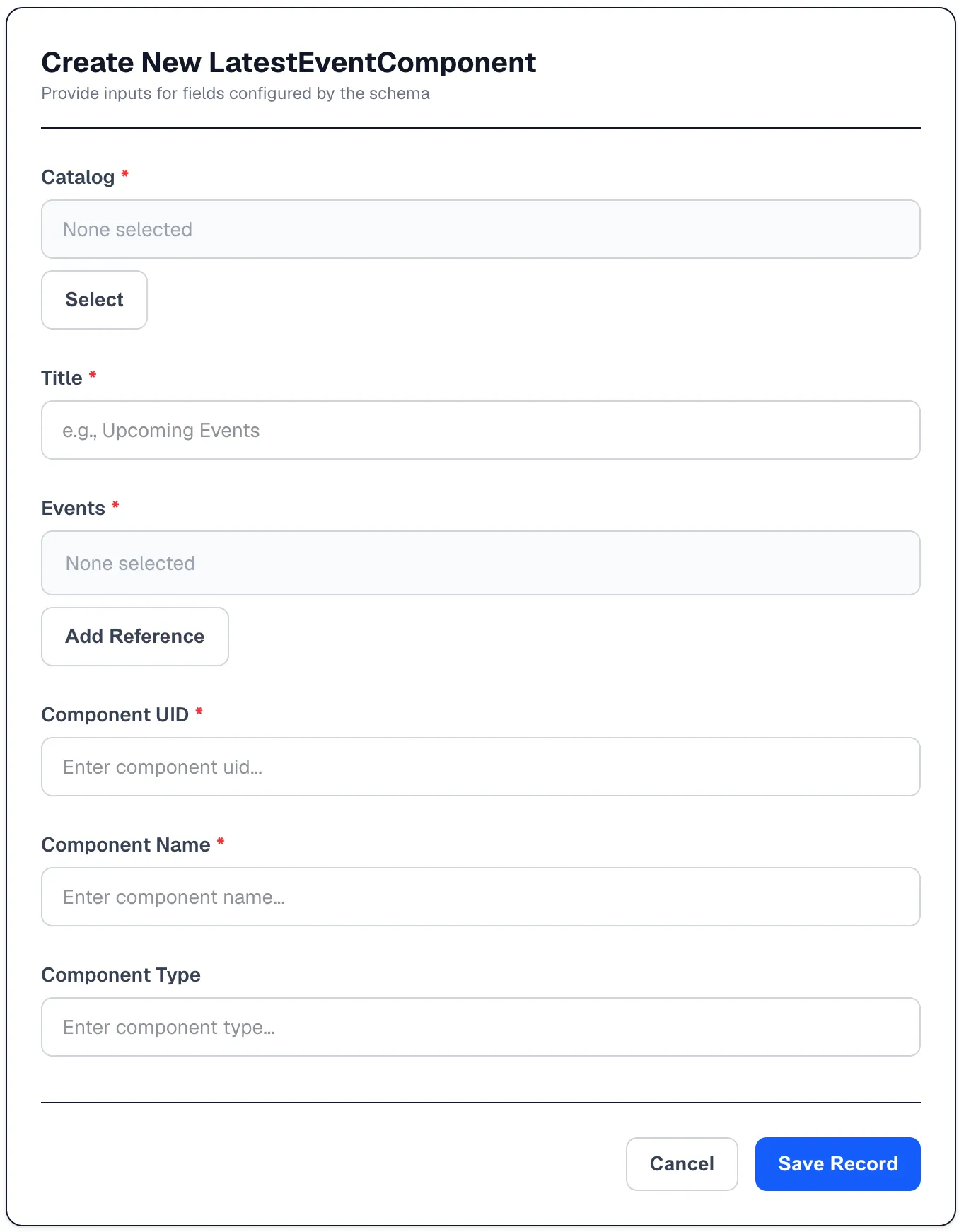
Text fields (STRING), reference selection buttons (REFERENCE), mandatory fields are rendered without writing model-specific form components.
2. Single-Item Reference Selection
Clicking "Select" on a single-cardinality reference field opens ReferencePickerModal in SINGLE mode:
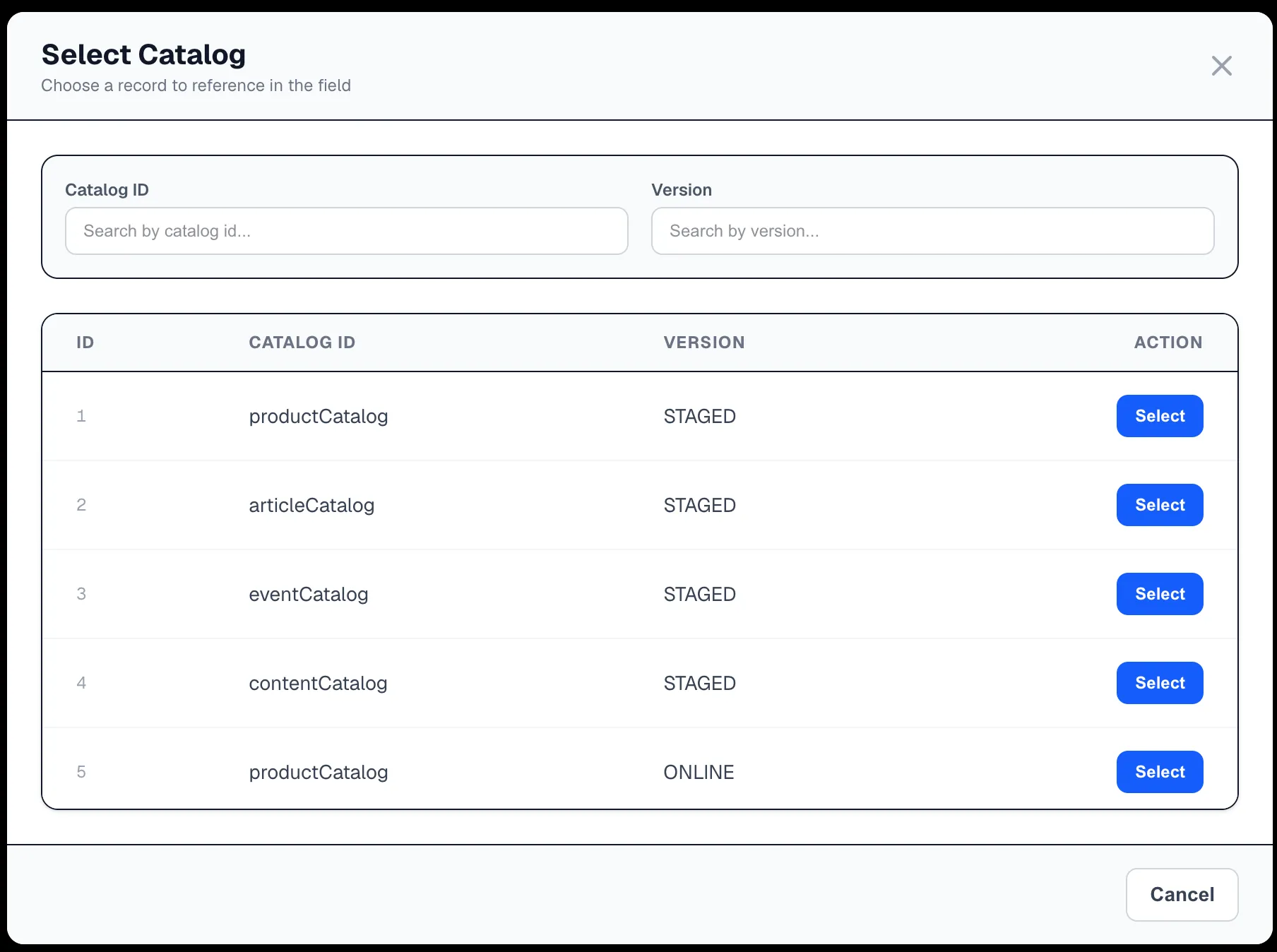
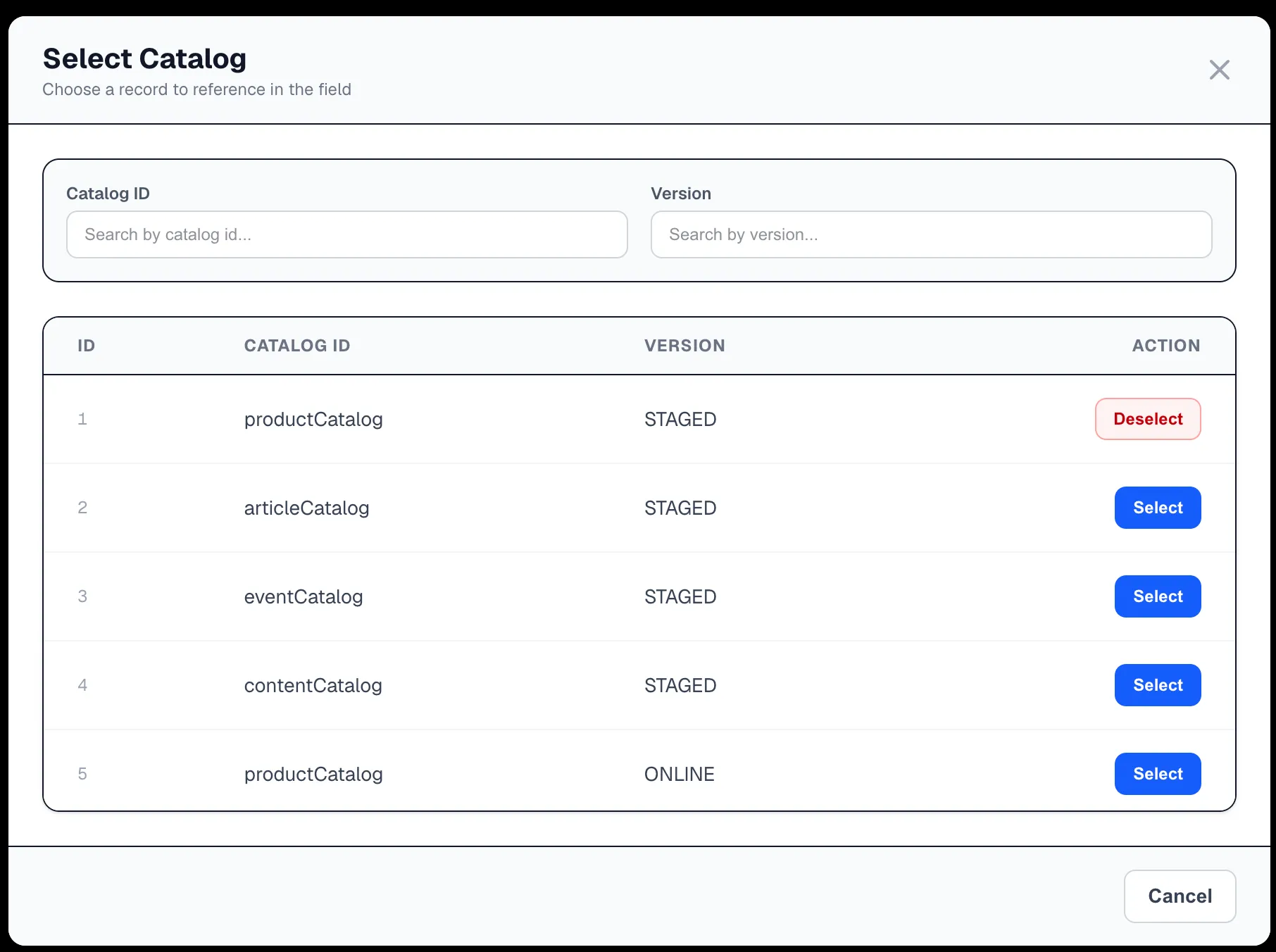
Selecting an item sets the active choice and closes the modal. The modal is displayed again when the user clicks "Select" again, now the button "Select" for the choosen one change to "Deselect":
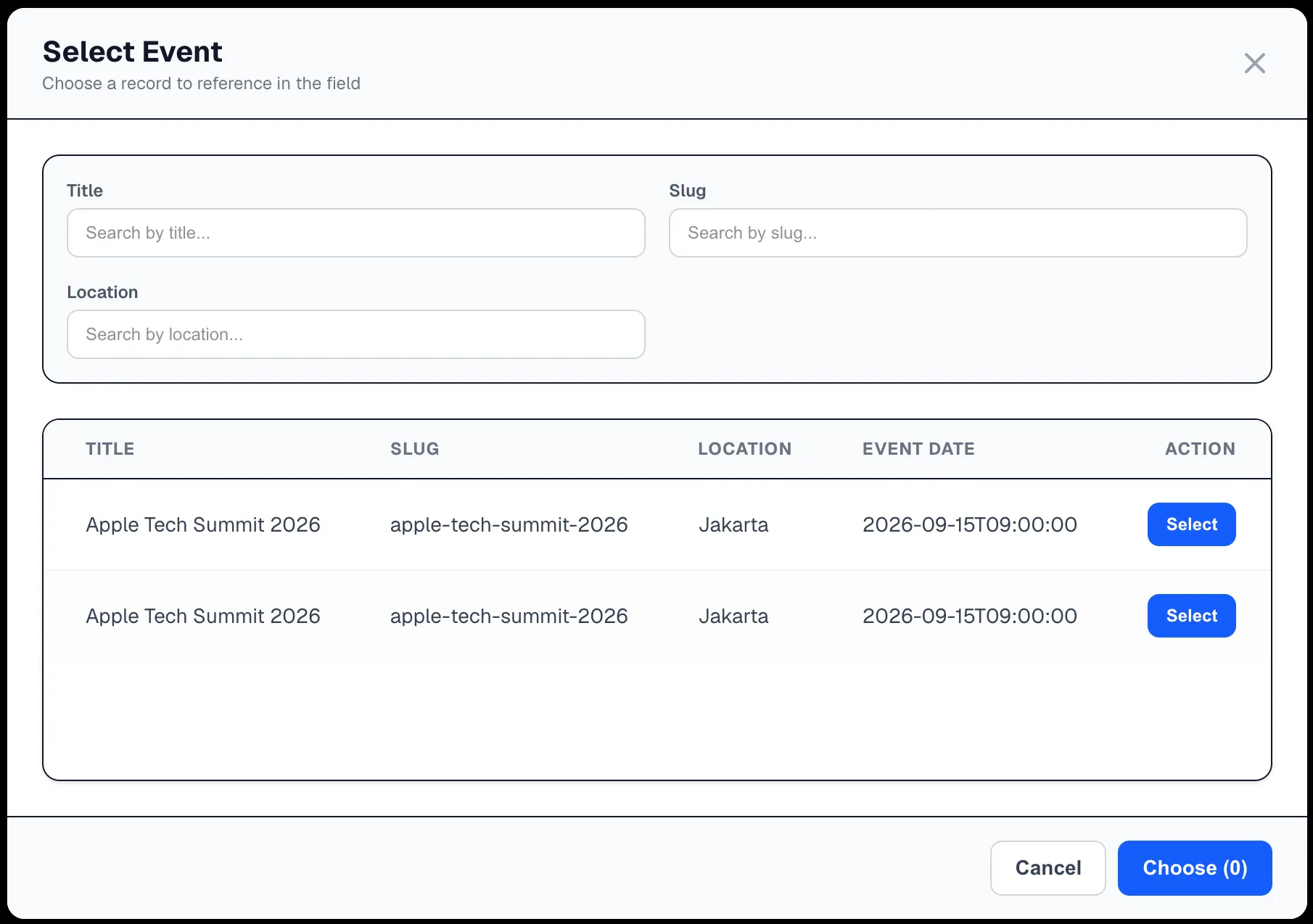
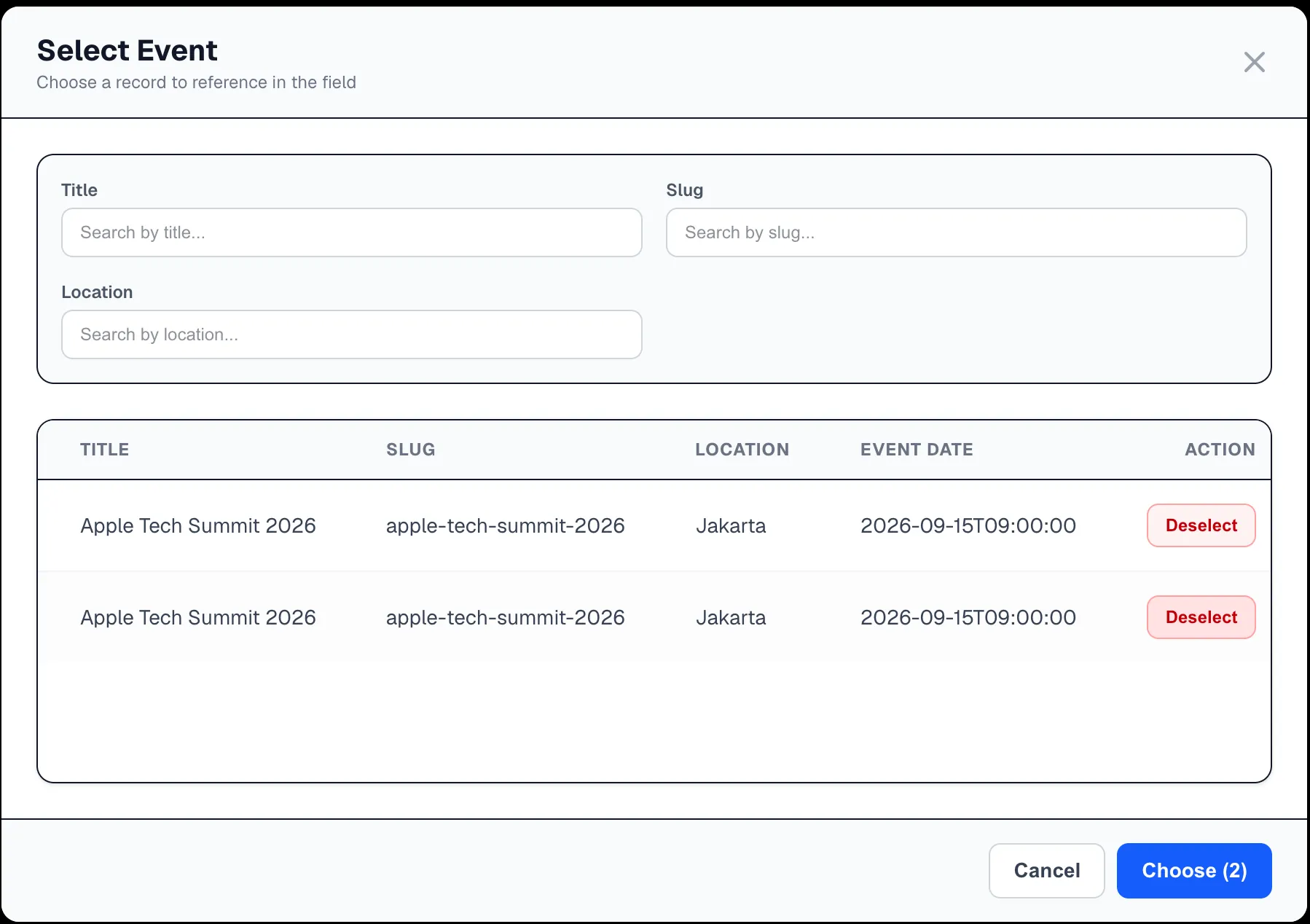
3. Multi-Item Reference Selection
For fields with MULTIPLE cardinality, the select button will not autoclose the modal. This allows content editors to select multiple entity items before confirming. The select button for the choosen one change to "Deselect" and if it is deselected, it will go back to "Select". When the editor clicks the "Choose" button, the modal will close and the selected items will be displayed as tags in the form.
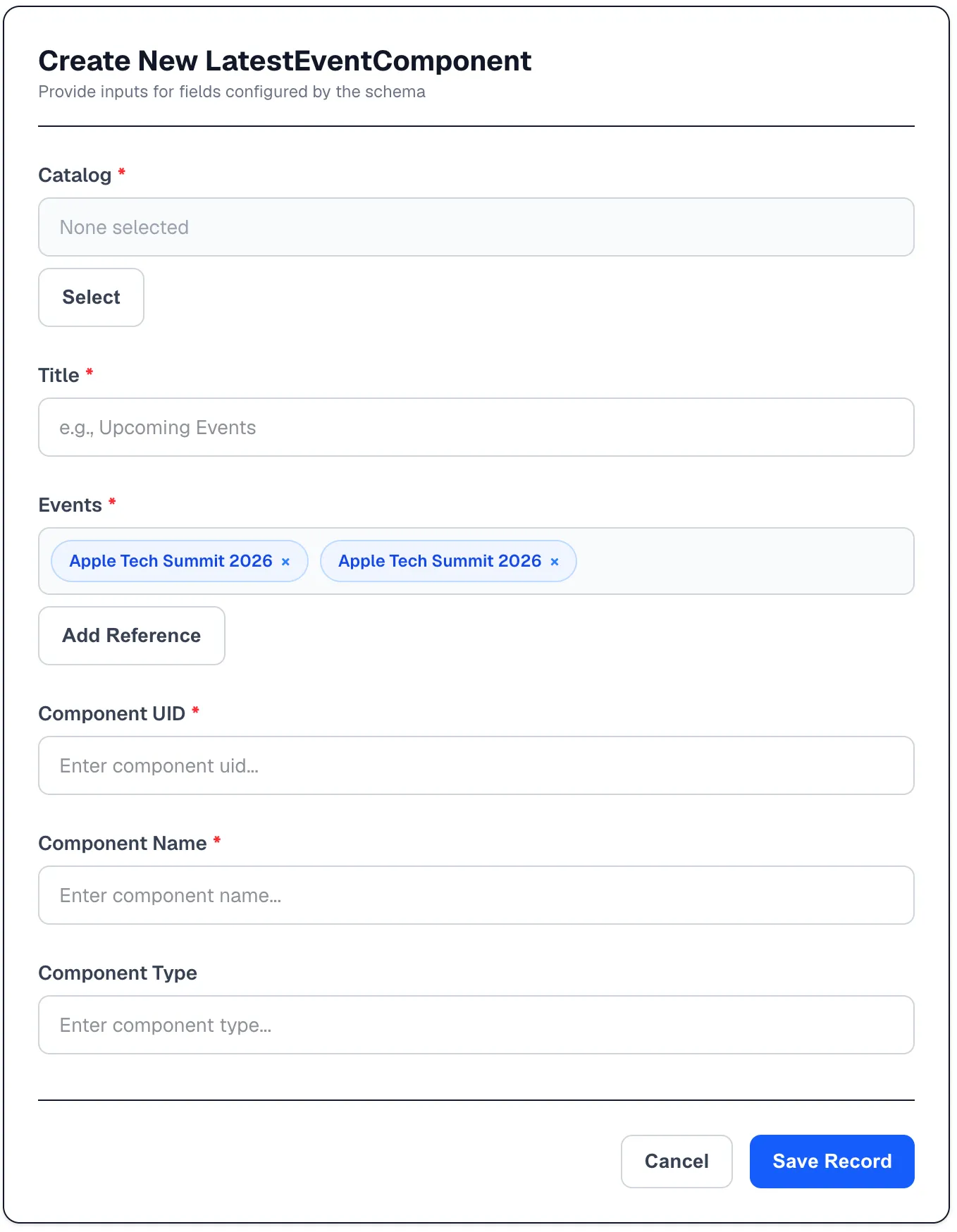
4. Form State & Payload Serialization
Once references are chosen, CmsForm displays label from toItemSearchResultDTO() of the selected entities, this was covered in Part 2:
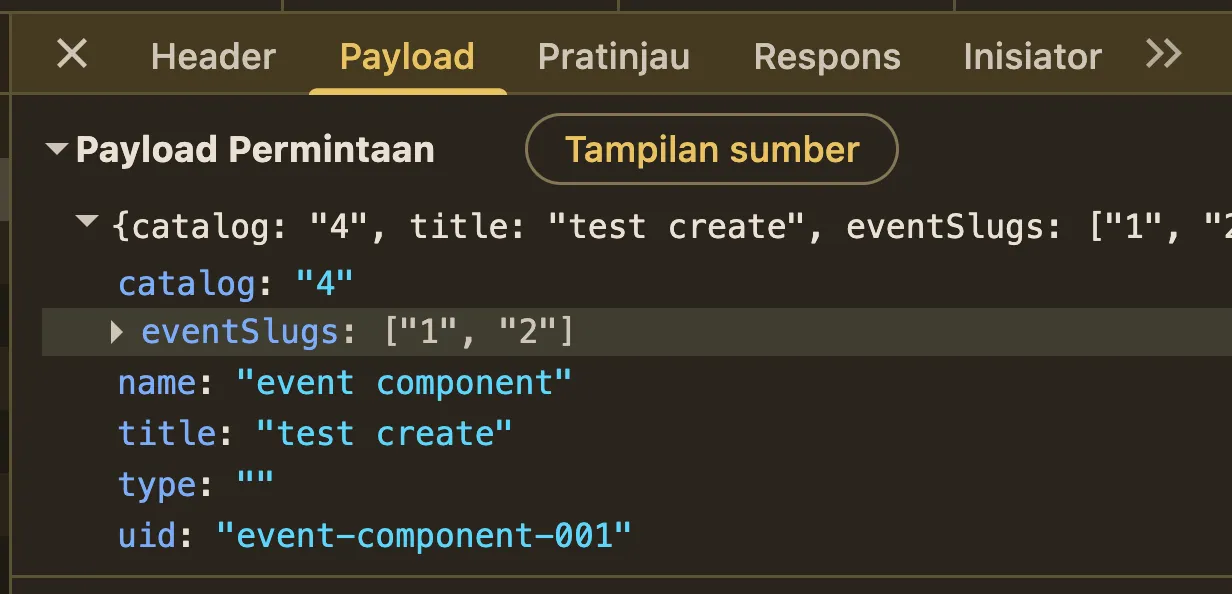
Before submitting, CmsForm serializes reference objects down to raw ID arrays or single ID values:
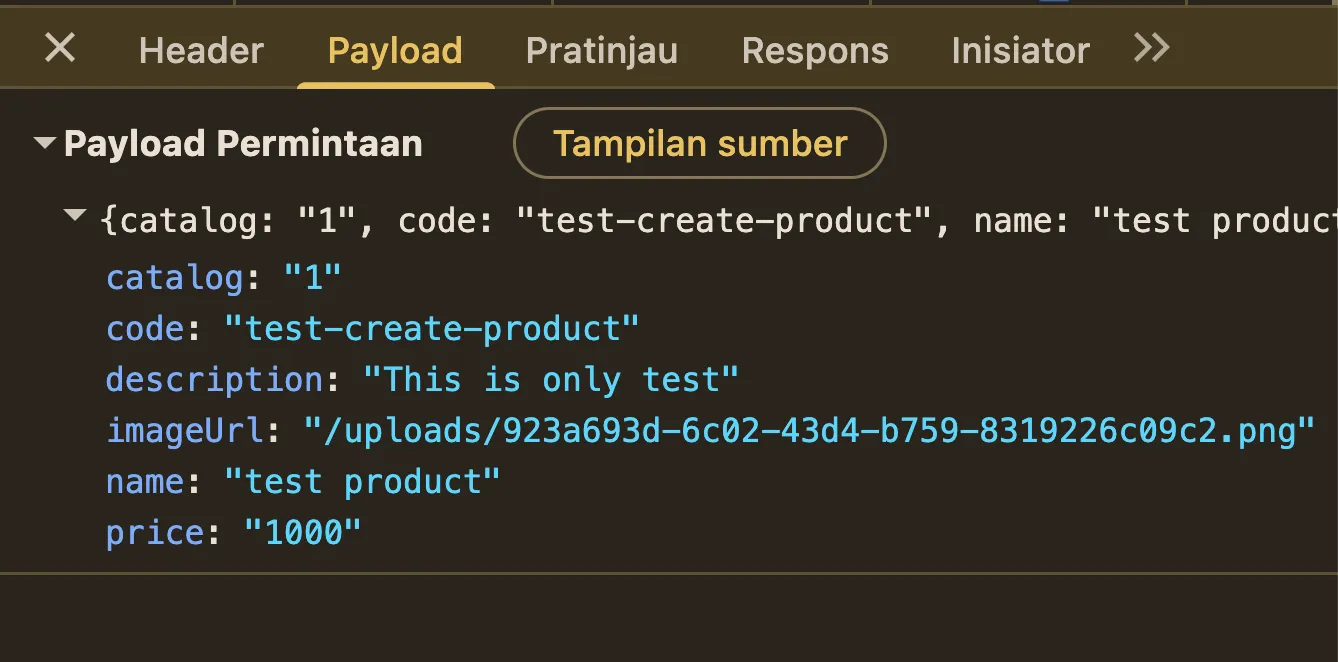
Similarly, submitting a Product uses the same API:
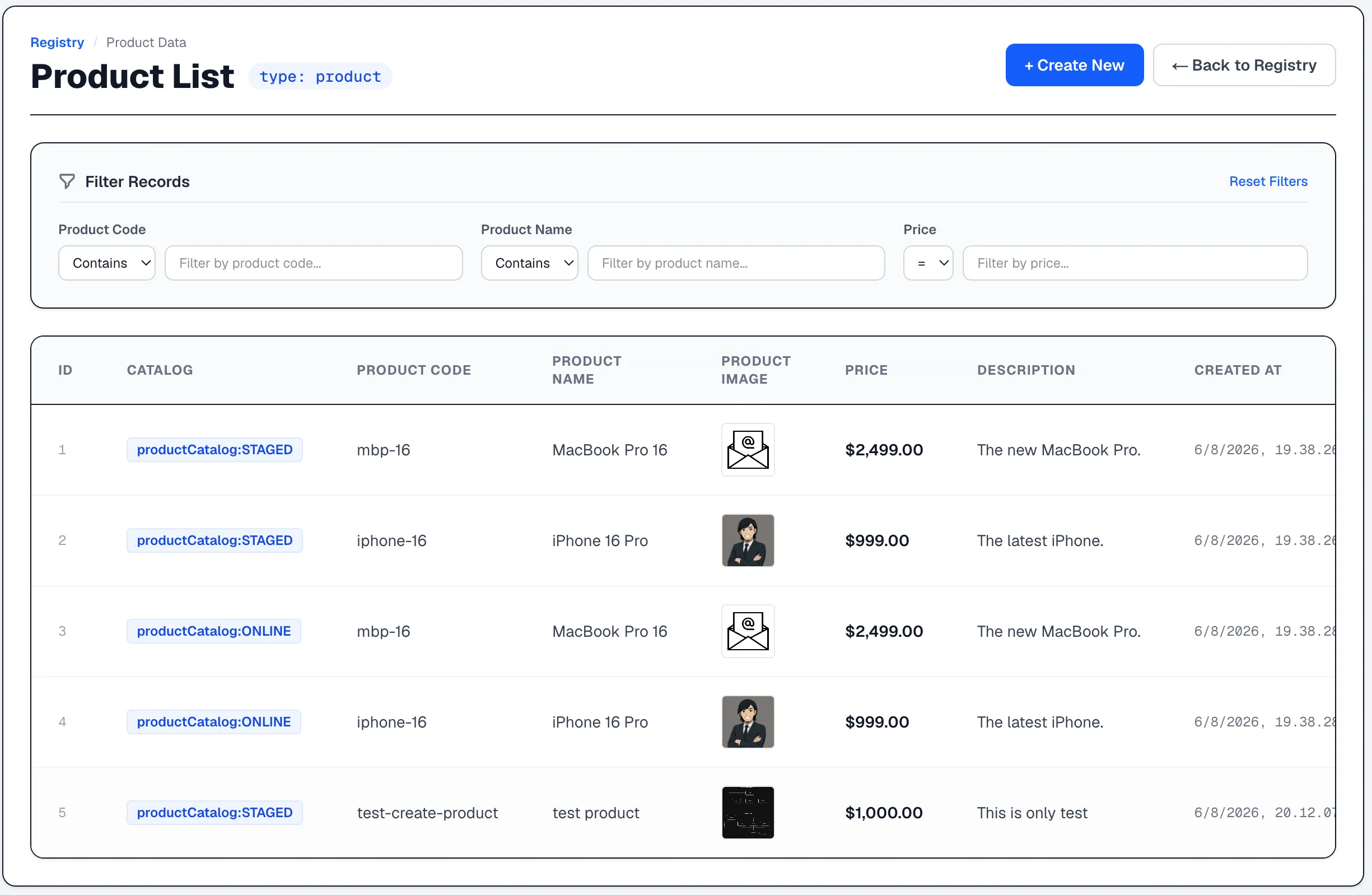
5. Table Refresh After Creation
Submitting the form posts the entity payload to /api/cms/items/{type} and redirects back to the listing table, where the new record appears immediately:
Conclusion
By extending the unified metadata schema with form-specific attributes (required, editableOnUpdate, type, reference, referenceCardinality), the same CmsTypeRegistry that powers entity discovery and generic data tables in Part 3 now also drives complete Create and Edit interfaces.
Adding a new entity to the system continues to remain a backend-only task. Engineers annotate entity fields, and the administration portal automatically provides a discovery card, a data listing page, a create form, an edit form, and a reference picker for any relational links.
This completes the core metadata-driven administration loop: discover, list, create, edit, and delete. All of this is achieved without writing entity-specific frontend code.
What's Next?
With discovery, generic tables, and dynamic form generation in place, administrators can model, create, and modify structured content without UI code duplication. However, editing records directly in a production database introduces operational risk: unfinished drafts or unapproved copy would immediately impact shoppers on the live storefront.
As introduced in Part 1 of this series, our system uses a dual-catalog architecture (STAGED vs. ONLINE) and topological publishing to isolate editorial workflows from live customer traffic. But what happens inside the backend when complex relational graphs must be synchronized without breaking foreign-key constraints or creating orphaned references?
In Part 5 of this series, we take a deep dive into the synchronization engine, examining how our backend resolves relational publishing order automatically using Kahn's topological sorting algorithm over the JPA Metamodel and merges entities generically across isolated catalogs.