Table of Contents
- Introduction
- The Generic Search Workflow
- Backend: Annotation-Driven Metadata
- Backend: Schema Reflection & Dynamic Query Execution
- Frontend: Schema-Driven Selection Fields
- Extending the System to New Domains
- Conclusion
- What's Next?
Introduction
Note: This article is part of a series. The implementation shown here was built through vibe coding, and the complete source code is available in the Headless CMS Demo repository. For full transparency, I also used AI to help draft this article. However, the system architecture, design decisions, and trade-off analysis are my own, developed through brainstorming and iterative discussions with AI.
In Part 1 of the Headless CMS case study, we discussed how we decoupled frontend page structures from backend schemas using slot-based layout engines, two-stage catalog publishing, and topological sync operations.
While that setup solved page rendering and publishing isolation, a new challenge quickly emerged: administrative search and item selection.
When content editors build landing pages, they frequently need to configure components that link to catalog items, such as a "Product Carousel" referencing specific products, or a "Trending Articles" list referencing editorial content.
If we hardcode a custom search endpoint and a unique search modal for every new entity type, we create significant UI code duplication and tight coupling. Every new domain model would require:
- A new backend REST endpoint for filtering.
- A new frontend API client method.
- A unique modal component with specialized search inputs and results styling.
To solve this, we introduced a metadata-driven field model that powers generic entity search today and lays the foundation for additional schema-driven CMS capabilities discussed in later parts of this series. The result is a CMS Admin UI that can dynamically discover searchable attributes of any registered backend entity and build interactive search filters at runtime, without requiring frontend code changes when a new domain is added.
The Generic Search Workflow
The core idea of this architecture is to treat the search schema as metadata. Rather than the CMS Admin UI knowing what fields a Product or Article has, it queries the backend's metadata registry for that entity type.
sequenceDiagram
    participant UI as CMS Admin UI (Next.js)
    participant API as CMS Backend (Spring Boot)
    participant DB as Database (JPA)

    UI->>API: GET /api/cms/items/{type}/search-metadata
    Note over API: Scans field annotations<br/>(e.g., @CmsField(searchable=true))
    API-->>UI: Return SearchField list (only @CmsField where searchable=true)

    Note over UI: Renders query inputs and operators dynamically<br/>based on metadata fields

    UI->>API: POST /api/cms/items/{type}/search (Criteria List)
    Note over API: Translates criteria list<br/>into JPA Query
    API->>DB: Query with dynamic WHERE predicates
    DB-->>API: Return Entities
    API-->>UI: Return List<ItemSearchResultDTO> (id, label, subLabel)

    Note over UI: Renders selection checkboxes
By decoupling the search interface from the database schema:
- The backend remains the single source of truth for searchable fields.
- The frontend admin UI resolves input controls dynamically.
- The search execution layer routes criteria to a generic, metadata-driven JPQL query builder.
Backend: Annotation-Driven Metadata
In Part 1, we introduced @CmsField as the metadata contract used to generate dynamic CMS forms. In this article, we extend the same annotation so it also describes which fields participate in generic entity search.
Although @CmsField was originally introduced to describe form metadata, it also provides enough information to drive generic search. By adding searchable = true, the same metadata becomes the source of truth for both form generation and search schema registration.
1. The Unified Field Annotation
@Target(ElementType.FIELD)
@Retention(RetentionPolicy.RUNTIME)
public @interface CmsField {
    String displayName();
    CmsFieldType type() default CmsFieldType.STRING;
    String placeholder() default "";
    boolean searchable() default false;
    Class<? extends ItemModel> targetEntity() default ItemModel.class;
    ReferenceCardinality cardinality() default ReferenceCardinality.SINGLE;
}
For fields representing relations, the ReferenceCardinality enum defines whether the field accepts a single item or multiple items:
public enum ReferenceCardinality {
    SINGLE,
    MULTIPLE
}
2. Annotating the Entities
Any entity class can expose its searchable properties to the generic search engine by applying @CmsField(searchable = true, ...). For instance, the Product entity exposes its catalog code, name, and price:
public class Product extends CatalogAwareModel {

    @CmsField(
        displayName = "Product Code",
        type = CmsFieldType.STRING,
        searchable = true
    )
    private String code;

    @CmsField(
        displayName = "Product Name",
        type = CmsFieldType.STRING,
        searchable = true
    )
    private String name;

    @CmsField(
        displayName = "Price",
        type = CmsFieldType.NUMBER,
        searchable = true
    )
    private BigDecimal price;

    // Standard getters and setters...
}
Backend: Schema Reflection & Dynamic Query Execution
Our backend separates two concerns: CmsTypeRegistry scans and caches entity metadata at application startup, while ItemSearchService uses that registry to execute criteria-based JPA queries at request time.
1. The Metadata Registry
At application startup, CmsTypeRegistry scans the JPA metamodel, finds all ItemModel subclasses, and caches their metadata into an in-memory map keyed by lowercase type code:
public class CmsTypeRegistry {
    private final Map<String, CmsTypeMetadata> registry = new ConcurrentHashMap<>();

    @PostConstruct
    public void init() {
        // Scan JPA metamodel for all entities extending ItemModel
        for (EntityType<?> entityType : entityManager.getMetamodel().getEntities()) {
            Class<?> javaType = entityType.getJavaType();
            if (ItemModel.class.isAssignableFrom(javaType)) {
                String typeCode = javaType.getSimpleName().toLowerCase();
                registry.put(typeCode, buildTypeMetadata(javaType));
            }
        }
    }

    public CmsTypeMetadata getTypeMetadata(String code) {
        return registry.get(code.toLowerCase());
    }
}
CmsTypeMetadata holds the entity class reference alongside the list of reflected field metadata objects built from @CmsField annotations. New entity types are picked up automatically at startup with no manual registration code required.
2. Runtime Metadata Extraction
When the frontend requests search metadata for an entity type, ItemSearchService delegates the lookup to CmsTypeRegistry, which has already pre-computed the field metadata at startup. The service simply filters for searchable fields and maps them into lightweight SearchField DTOs (containing name, displayName, and type):
public class ItemSearchService {

    public ItemSearchMetadataDTO getSearchMetadata(String type) {
        CmsTypeMetadata meta = cmsTypeRegistry.getTypeMetadata(type);

        List<SearchField> fields = meta.getFields().stream()
                .filter(CmsFieldMetadata::isSearchable)
                .map(f -> new SearchField(f.getName(), f.getDisplayName(), f.getType().name().toLowerCase()))
                .collect(Collectors.toList());

        return new ItemSearchMetadataDTO(fields);
    }
}
Separation of Concerns: Delegating type lookups to CmsTypeRegistry keeps ItemSearchService focused on query execution. By pre-computing and caching the reflected field lists in CmsTypeMetadata during application startup, the search metadata endpoint becomes a fast, in-memory operation that avoids reflection overhead during request handling.
3. Generic Query Execution & Dynamic Type Conversion
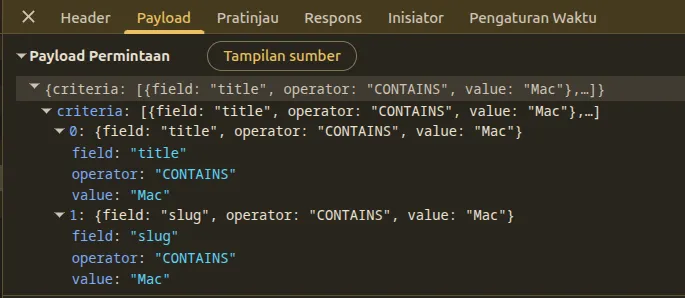
To search items, our controller accepts a structured list of criteria, where each criterion specifies a field, an operator (such as EQUALS, CONTAINS, MORE_THAN, LESS_THAN), and a search value.
Standardizing our search output structure into a common ItemSearchResultDTO allows our frontend UI to display search listings uniformly without knowing the exact database schema. By declaring a polymorphic toItemSearchResultDTO() method on our root entity superclass (ItemModel) with a default fallback implementation (which returns the entity ID, its simple class name as the display label, and its creation timestamp as the sub-label), our search service maps results cleanly without type-checking specific domain classes.
Additionally, REST search parameters arrive from the frontend as JSON strings (e.g., "100.00" or "true").
Because JPQL parameters must match the underlying Java field type, our engine must perform dynamic parameter type conversion before binding query values. Using the pre-computed metadata, the service inspects the field type and automatically parses string inputs into BigDecimal, Long, Integer, Double, or Boolean instances:
public List<ItemSearchResultDTO> searchItems(String type, List<SearchCriteria> criteria) {
    CmsTypeMetadata meta = cmsTypeRegistry.getTypeMetadata(type);

    List<?> entities = executeQuery(meta, criteria);
    return entities.stream()
            .map(e -> ((ItemModel) e).toItemSearchResultDTO())
            .collect(Collectors.toList());
}

private <T> List<T> executeQuery(CmsTypeMetadata meta, List<SearchCriteria> criteria) {
    Class<T> clazz = (Class<T>) meta.getEntityClass();
    Set<String> allowedFields = getAllowedFields(meta);
    StringBuilder jpql = new StringBuilder("SELECT x FROM ")
            .append(clazz.getSimpleName())
            .append(" x WHERE 1=1");
    Map<String, Object> params = new HashMap<>();

    for (int i = 0; i < criteria.size(); i++) {
        SearchCriteria c = criteria.get(i);
        if (!allowedFields.contains(c.getField()) || c.getValue().trim().isEmpty()) {
            continue;
        }

        String paramName = c.getField() + i;
        SearchOperator operator = c.getOperator();

        CmsFieldMetadata fieldMeta = meta.getFields().stream()
                .filter(f -> f.getName().equals(c.getField()))
                .findFirst()
                .orElse(null);

        // Coerce CONTAINS to EQUALS for numeric fields
        if (isNumericField(fieldMeta, c.getField()) && operator == SearchOperator.CONTAINS) {
            operator = SearchOperator.EQUALS;
        }

        Object paramValue = convertParamValue(fieldMeta, c.getField(), c.getValue());

        switch (operator) {
            case EQUALS -> appendEquals(jpql, params, c.getField(), paramName, paramValue);
            case MORE_THAN -> appendGreaterThan(jpql, params, c.getField(), paramName, paramValue);
            case LESS_THAN -> appendLessThan(jpql, params, c.getField(), paramName, paramValue);
            default -> appendContains(jpql, params, c.getField(), paramName, c.getValue());
        }
    }

    Query query = entityManager.createQuery(jpql.toString(), clazz);
    params.forEach(query::setParameter);
    return query.getResultList();
}
Note: Helper methods
getAllowedFields(),isNumericField(),convertParamValue(), and theappend*()methods perform the metadata-based type checking, conversion logic, and JPQL clause construction. They're omitted here for brevity.
Key Design Points:
- Allow-Listing Primary Keys:
getAllowedFields()automatically includes"id"even without@CmsField(searchable = true), enabling the backend to fetch saved component selections by primary key. - Parameter Name Uniqueness: Appending the loop index (
key + i) prevents JPQL parameter collisions when multiple criteria target the same field. - JPQL Injection Protection: Field names are validated against the annotation-derived allow-list, operators are strongly typed, and search values are bound as named parameters rather than concatenated into the query string.
- Type Safety: The
SearchOperatorenum and metadata-based type conversion ensure that numeric fields reject pattern matching operators and parse values correctly.
Production Considerations: This implementation focuses on demonstrating the metadata-driven pattern. Production systems should add pagination (.setMaxResults()), sorting, and handle edge cases like entity name collisions across packages.
Frontend: Schema-Driven Selection Fields
On the frontend, when configuring a component, the form loader dynamically maps fields of type REFERENCE to selection inputs based on the target entity type and cardinality, using the schema returned by the backend.
1. Reference Metadata Fetching
During component initialization, the form loader checks if a field type is reference, fetches its metadata schema, and loads initial search results:
if (field.type === 'reference') {
  const itemType = field.referenceTarget; // e.g. "product"

  const meta = await cmsApiClient.getSearchMetadata(itemType);
  setSearchMetadata(prev => ({ ...prev, [itemType]: meta.data }));

  const res = await cmsApiClient.searchItems(itemType, []);
  setSearchResults(prev => ({ ...prev, [itemType]: res.data }));
}
When /api/cms/items/product/search-metadata is called, the backend returns a lightweight JSON schema describing only the allowed search attributes:
{
  "fields": [
    {
      "name": "code",
      "displayName": "Product Code",
      "type": "string"
    },
    {
      "name": "price",
      "displayName": "Price",
      "type": "number"
    }
  ]
}
This JSON schema acts as the contract between backend and frontend, allowing the admin UI to build appropriate query forms without hardcoded UI components.
2. Rendering Search Filters Dynamically
The metadata drives dynamic rendering of type-aware search controls:
{field.type === 'reference' && (
  <div>
    {searchMetadata[field.referenceTarget]?.fields?.map(metaField => (
      <div key={metaField.name}>
        {/* Type-aware operator dropdown */}
        <select value={...} onChange={...}>
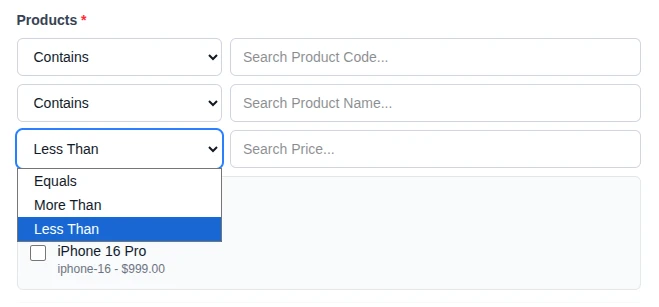
          {metaField.type !== 'number' && <option value="CONTAINS">Contains</option>}
          <option value="EQUALS">Equals</option>
          {metaField.type === 'number' && (
            <>
              <option value="MORE_THAN">More Than</option>
              <option value="LESS_THAN">Less Than</option>
            </>
          )}
        </select>
        <input placeholder={`Search ${metaField.displayName}...`} onChange={...} />
      </div>
    ))}

    {searchResults[field.referenceTarget]?.map(item => (
      <label key={item.id}>
        {/* Cardinality-driven input type */}
        <input type={field.referenceCardinality === 'MULTIPLE' ? "checkbox" : "radio"} onChange={...} />
        <span>{item.label}</span>
      </label>
    ))}
  </div>
)}
The UI iterates over searchMetadata.fields to generate inputs. Type conditionals (metaField.type === 'number') control which operators appear, and cardinality (SINGLE vs. MULTIPLE) determines checkbox vs. radio rendering, all without hardcoding entity-specific forms.
Extending the System to New Domains
By combining JPA metamodel auto-discovery with field-level @CmsField annotations and standardizing search UI selection flows, adding a new domain type (like Article or Event) is straightforward and requires no separate registration code.
Step 1: Annotating the Entity Fields
To make an Article searchable, we apply @CmsField(searchable = true) directly to the target properties:
public class Article extends CatalogAwareModel {

    @CmsField(
        displayName = "Title",
        type = CmsFieldType.STRING,
        searchable = true
    )
    private String title;

    @CmsField(
        displayName = "Slug",
        type = CmsFieldType.STRING,
        searchable = true
    )
    private String slug;

    @CmsField(
        displayName = "Body",
        type = CmsFieldType.TEXT
    )
    private String body;
}
Step 2: Defining the CMS Field on the Component
We define the component's field type using CmsFieldType.REFERENCE and specify the target entity class along with the cardinality. For example, a TrendingArticleComponent references multiple Article entities:
public class TrendingArticleComponent extends Component {
    private String title;

    @CmsField(
        displayName = "Articles",
        type = CmsFieldType.REFERENCE,
        targetEntity = Article.class,
        cardinality = ReferenceCardinality.MULTIPLE
    )
    private String articleSlugs;
}
Similarly, for single-item selection, a TopEventComponent references one Event:
public class TopEventComponent extends Component {
    @CmsField(
        displayName = "Featured Event",
        type = CmsFieldType.REFERENCE,
        targetEntity = Event.class,
        cardinality = ReferenceCardinality.SINGLE
    )
    private String eventSlug;
}
Frontend Extensibility Without Code Changes
Without modifying frontend React code, creating custom components, or registering new REST endpoints, the Admin UI automatically:
- Detects the
REFERENCEtype along with target and cardinality details from the schema. - Queries the metadata schema at
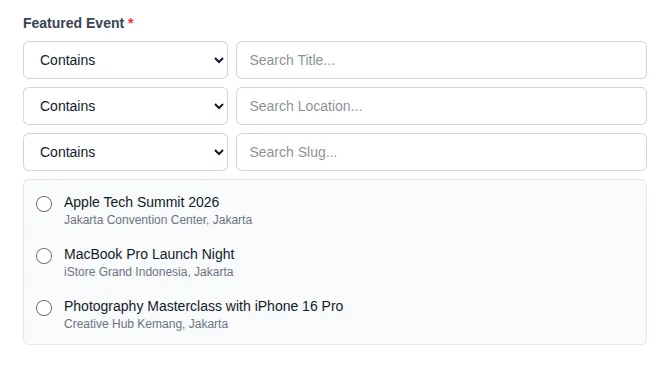
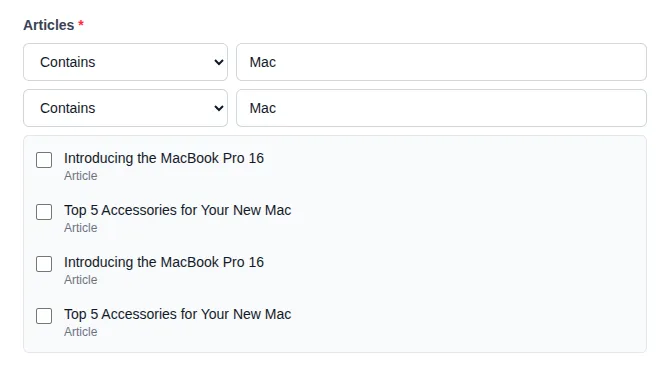
/api/cms/items/article/search-metadataand/api/cms/items/event/search-metadata. - Dynamically renders operator dropdowns and search text boxes labeled "Search Title..." based on the returned annotations.
- Executes searches and dynamically renders checkboxes (for
MULTIPLEcardinality) or radio buttons (forSINGLEcardinality) based on field metadata.
Here is how the dynamic selection interface renders in the Admin UI for single-item fields (like TopEventComponent):
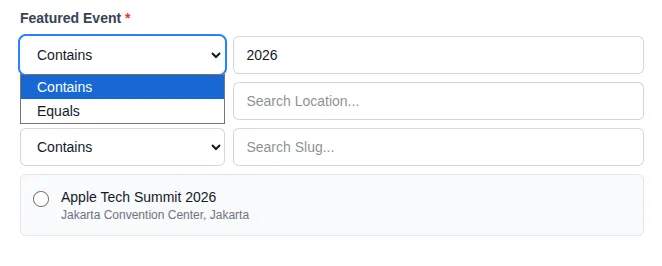
When an editor interacts with the search filters, the dynamic operator dropdown allows precise querying (Contains, Equals, etc.):
For numeric fields (such as product price), the dropdown dynamically restricts options to mathematical operators (Equals, More Than, Less Than):
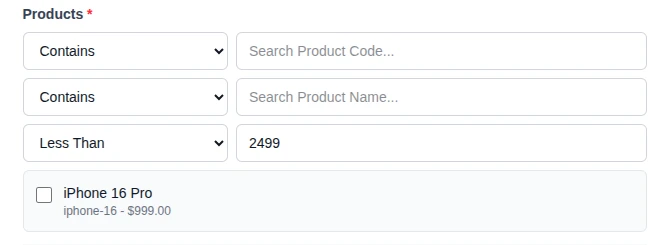
Executing a numeric search dynamically filters matching database entities based on the comparison:
For multi-item fields (like TrendingArticleComponent), the interface renders multiple selection checkboxes:
When searching, the Admin UI inspects the selected operators and transmits structured criteria payloads over the network:
On the backend, because JPA's metamodel automatically discovers entity classes at application startup and our query generator inspects field annotations at runtime, adding a searchable entity requires no manual service or registry code modifications. We only need to annotate the desired entity properties with @CmsField(searchable = true) and optionally override toItemSearchResultDTO() to customize display labels (if not overridden, it falls back to returning the entity ID, its simple class name as the display label, and its creation timestamp as the sub-label).
When Would I Not Use This Architecture?: This approach is intentionally designed for administrative CRUD search with a small, finite operator set. For full-text search, typo tolerance, relevance ranking, faceted navigation, or large-scale catalog search, dedicated search engines such as OpenSearch, Elasticsearch, or Solr remain the more appropriate choice.
Conclusion
To put the impact of this architecture in perspective, consider the engineering overhead of introducing a new searchable entity (like Article or Event) into our content system:
- Boilerplate Approach: Requires creating and maintaining separate integration points across the stack for every new entity type: a dedicated backend controller and search endpoint, a frontend API client method, and a custom React search modal with specialized form state management, operator selection, and results rendering. As the number of searchable domain models grows, this approach multiplies code duplication and creates tight coupling between frontend UI components and backend schema definitions.
- Dynamic Metadata Approach: Requires adding a single annotation property (
@CmsField(searchable = true)) to the backend entity. The JPA metamodel dynamically registers the class, the reflection engine constructs the query allowlist, and the schema-driven frontend builder automatically renders the search controls and operators at runtime.
By treating search schemas as field-level metadata and combining them with JPA metamodel auto-discovery, we eliminate boilerplate registration maps and reduce backend integration effort to field annotations. Because our query execution layer resolves allowed fields and constructs JPQL queries at runtime, our architecture establishes a clean separation of concerns and provides content editors with a consistent search interface across all entity types without requiring domain-specific query boilerplate.
What's Next?
We've built a generic search engine that discovers entity schemas at runtime and renders appropriate search filters without hardcoding entity types. However, a complete content management system requires more than just search: editors need to browse all available domain models, view data in tabular listings, and create or modify records through structured forms.
If we were to follow traditional CMS patterns, every new entity would require a dedicated navigation menu item, a custom data table component with hardcoded column definitions, and specialized create and edit forms with entity-specific input controls. But what if the backend could describe its own structure to the frontend by exposing an "All Models" registry that generates navigation automatically, and serving table schemas that render any entity type through a single reusable component?
In the next part of this series, we'll extend the same metadata-driven foundation to power a fully dynamic administrative interface where introducing a new domain model requires no frontend code changes or UI redeployments.