Introduction
If you are a developer working with SAP Commerce (formerly known as SAP Hybris), you are likely intimately familiar with the platform's lengthy build times. SAP Commerce relies heavily on Apache Ant for its build processes, which involves a massive amount of code generation, file copying, and the creation of thousands of symbolic links (symlinks) across various extensions.
Because of this heavy disk I/O dependency, build times can become a significant bottleneck for developer productivity. Waiting for a build to finish breaks flow state and reduces the number of iterations a developer can perform in a day.
To quantify this, I recently conducted a direct, side-by-side comparison of the SAP Commerce build times for one of our enterprise projects. I tested the exact same codebase and database on both Linux and Windows environments to see just how much the operating system impacts performance.
The Test Environment:
- Machine: The same physical hardware, set up with a dual boot configuration to ensure CPU, RAM, and SSD speeds were identical.
- Operating Systems: Windows 11 vs. Pop!_OS 22.04 (a Linux distribution).
- SAP Commerce Version: 2205.
- Database: SQL Server.
The Benchmark Results
As you can see from the benchmark metrics below, Windows performed significantly worse than Linux across the board. In most standard development tasks, the operations took 2 to 3 times longer on Windows compared to Linux.
(Note: The update system benchmark uses the ant updatesystem command with an added configuration to only update the running system and localized types, bypassing the full initialization).
Here is the breakdown of the performance differences:
- ant clean all: 3.31x longer on Windows. This is the most painful metric; a full clean build that might take 10 minutes on Linux could take over half an hour on Windows.
- ant all: 2x longer on Windows. Even incremental builds suffer a massive penalty.
- server uptime: 3.67x longer on Windows. Starting up the Tomcat server and the Spring context takes nearly four times as long.
- update system: 3.11x longer on Windows. Applying data model changes to the database is similarly delayed.
Why is Linux So Much Faster?
The stark difference in performance is not due to SAP Commerce being inherently hostile to Windows, but rather how the underlying operating systems handle file systems and background processes.
- File System and Symlinks: The SAP Commerce build process intensely relies on creating and managing symlinks to assemble the final deployment structure from dozens of different extensions. Linux's EXT4 file system handles symlinks and massive amounts of small file operations incredibly efficiently. Windows' NTFS file system, on the other hand, struggles with the rapid creation of thousands of symlinks, creating a severe bottleneck.
- Antivirus and Indexing: By default, Windows Defender and the Windows Search Indexer actively scan new files as they are created. When
ant clean allgenerates thousands of compiled.classfiles and XML configs, Windows intercepts these operations to scan them, dramatically slowing down disk I/O. While you can whitelist the SAP Commerce directory in Windows Defender, Linux generally lacks this aggressive overhead out of the box.
Benchmark Details
Below are the detailed screenshots from the console build logs capturing the exact execution times:
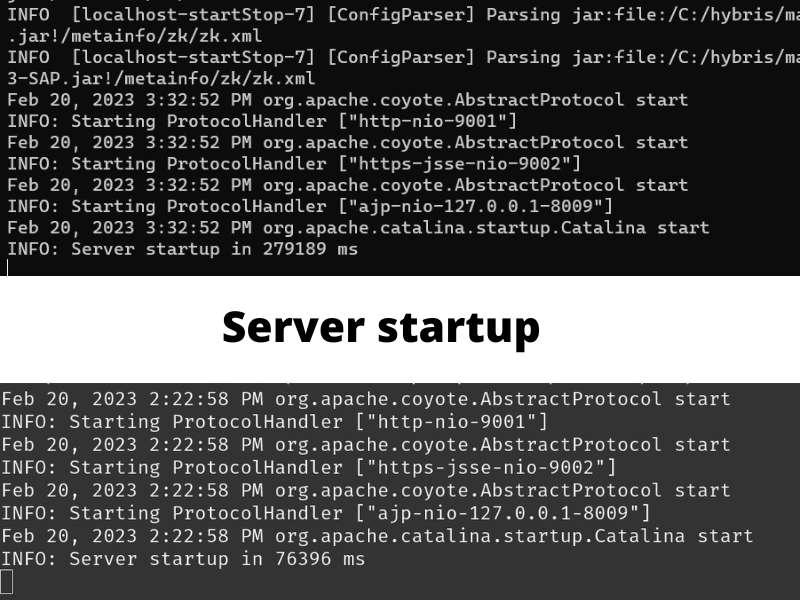 Running server startup on Windows vs Linux
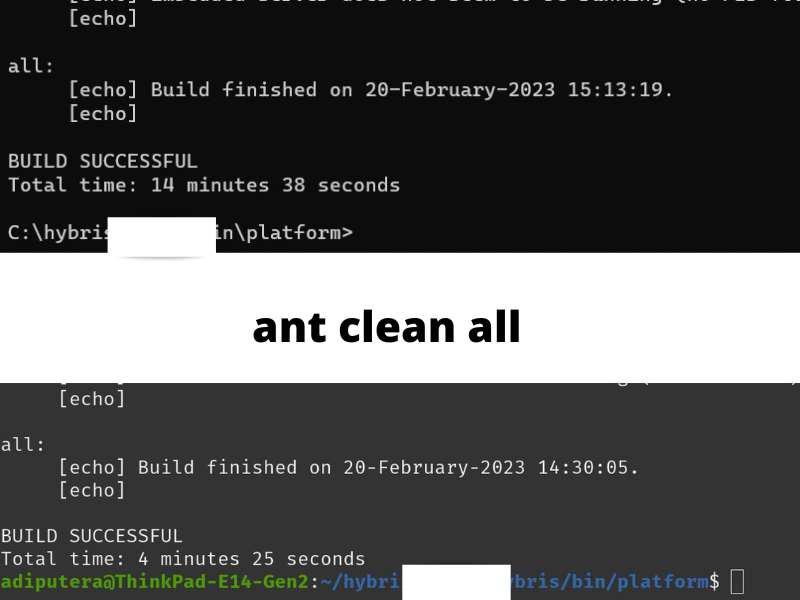 Running ant clean all on Windows vs Linux
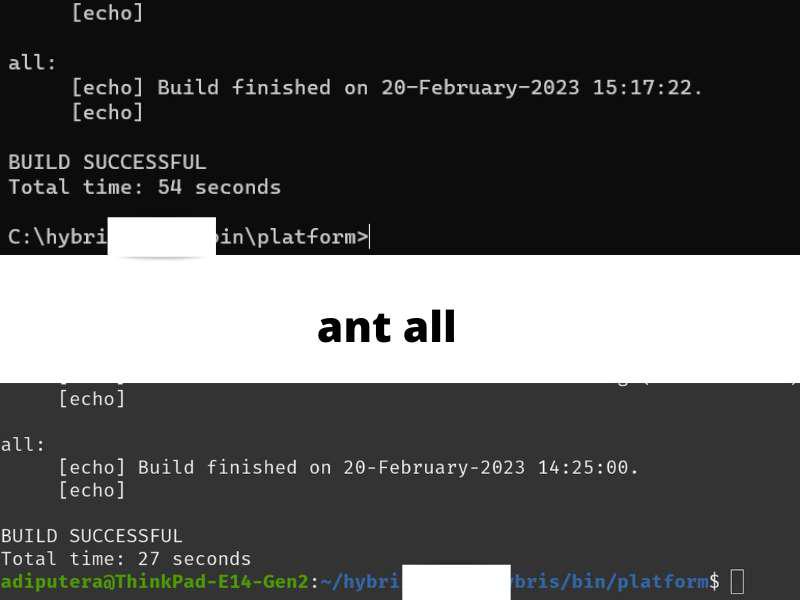 Running ant all on Windows vs Linux
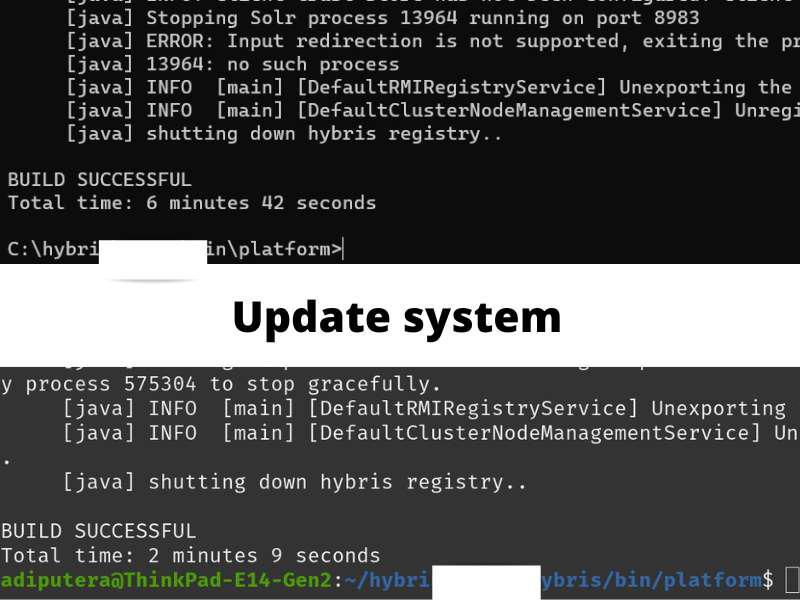 Running ant update system on Windows vs Linux
Conclusion and Recommendations
The data speaks for itself. If you want to optimize your SAP Commerce development workflow and regain hours of lost productivity every week, switching from Windows to a Unix-like environment (such as Linux or macOS) is one of the most effective upgrades you can make.
The performance difference is largely attributed to how intensely the build process creates symlinks and handles file system operations, which Unix-like systems execute far more efficiently than Windows.
If a full switch to a Linux desktop OS isn't feasible for your corporate environment, I highly recommend exploring Windows Subsystem for Linux (WSL2). Even with the virtualization overhead, these solutions often vastly outperform native Windows builds by leveraging a true Linux file system.
(Note on macOS: While many developers successfully use macOS for SAP Commerce, I didn't include it in this specific benchmark. Because macOS requires entirely different Apple hardware, it's impossible to make a true apples-to-apples 1-on-1 performance comparison against this specific dual-boot setup. However, thanks to its Unix-based foundation, macOS generally offers excellent build performance similar to Linux.)