The Background
SAP Commerce (SAP Hybris) Accelerator Storefront is a powerful, component-based front end that makes it easy for business users to change content without needing a deployment. But because of its rich content nature, rendering all components on every page load can take time — and on a website, every millisecond counts.
The idea is simple: components outside the viewport don't need to be loaded immediately. By deferring their rendering until the user scrolls to them, we can significantly reduce the initial page load time.
How It Works
At the first page load, components outside the viewport will not be rendered. Instead, we place a dummy element in place of each deferred component. When the dummy element enters the viewport (the user scrolls down), the browser makes an Ajax call to fetch the component's HTML and replaces the dummy element with the actual content.
This approach:
- Reduces initial page load time by only rendering visible components
- Loads off-screen components on demand as the user scrolls
- Works with the existing JSP-based Accelerator Storefront
Prerequisites
- Basic knowledge of SAP Commerce (SAP Hybris) Accelerator Storefront
- Understanding of JSP tag files and CMS component rendering
- Basic knowledge of JavaScript
Implementation
- Create 2 JSP files, cmscontentslot.jsp and cmscomponent.jsp. Cmscontentslot.jsp will be used for returning all components in a content slot, while cmscomponent.jsp will be used for returning single component by its UID.
- cmscontentslot.jsp
<%@ page trimDirectiveWhitespaces="true"%> <%@ taglib prefix="cms" uri="http://hybris.com/tld/cmstags"%> <%@ taglib prefix="fn" uri="http://java.sun.com/jsp/jstl/functions" %> <cms:pageSlot position="${slotPosition}" var="feature" element="${fn:escapeXml(slotElement)}" class="${fn:escapeXml(slotClass)}"> <cms:component component="${feature}" element="${fn:escapeXml(componentElement)}" class="${fn:escapeXml(componentClass)}"/> </cms:pageSlot>- cmscomponent.jsp
<%@ page trimDirectiveWhitespaces="true"%> <%@ taglib prefix="cms" uri="http://hybris.com/tld/cmstags"%> <%@ taglib prefix="fn" uri="http://java.sun.com/jsp/jstl/functions" %> <cms:component uid="${componentUid}" element="${fn:escapeXml(componentElement)}" class="${fn:escapeXml(componentClass)}"/> - Create the controller.
package id.adiputera.training.storefront.controllers.cms; import de.hybris.platform.acceleratorstorefrontcommons.controllers.pages.AbstractPageController; import de.hybris.platform.cms2.exceptions.CMSItemNotFoundException; import de.hybris.platform.cms2.model.pages.AbstractPageModel; import org.apache.commons.lang3.StringUtils; import org.springframework.http.HttpStatus; import org.springframework.stereotype.Controller; import org.springframework.ui.Model; import org.springframework.web.bind.annotation.ExceptionHandler; import org.springframework.web.bind.annotation.GetMapping; import org.springframework.web.bind.annotation.RequestParam; import org.springframework.web.bind.annotation.ResponseBody; import org.springframework.web.bind.annotation.ResponseStatus; import javax.servlet.http.HttpServletRequest; import javax.servlet.http.HttpServletResponse; import java.util.Map; import static org.apache.commons.lang.StringUtils.EMPTY; /** * The class ComponentController * This class have 1 API that will return the HTML of the components of the slot (if page id & slotPosition param is filled) * Or return HTML of the component, if component UID param is set * * @author Yusuf F. Adiputera */ @Controller public class ComponentController extends AbstractPageController { private static final String FRAGMENTS_CMS_CONTENT_SLOT = "fragments/cms/cmscontentslot"; // NOSONAR private static final String FRAGMENTS_CMS_COMPONENT = "fragments/cms/cmscomponent"; // NOSONAR @GetMapping(value = "/cms-components") public String renderComponentsOfTheSlot(final Model model, final HttpServletRequest request, final HttpServletResponse response, @RequestParam Map<String, String> parameters) throws CMSItemNotFoundException { final String componentUid = parameters.get("componentUid"); final String componentElement = parameters.get("componentElement"); final String componentClass = parameters.get("componentClass"); model.addAttribute("componentElement", componentElement); model.addAttribute("componentClass", componentClass); if (StringUtils.isNotBlank(componentUid)) { model.addAttribute("componentUid", componentUid); return FRAGMENTS_CMS_COMPONENT; } final String pageId = parameters.get("pageId"); AbstractPageModel pageModel = getContentPageForLabelOrId(pageId); storeCmsPageInModel(model, pageModel); final String slotPosition = parameters.get("slotPosition"); final String slotElement = parameters.get("slotElement"); final String slotClass = parameters.get("slotClass"); model.addAttribute("slotPosition", slotPosition); model.addAttribute("slotElement", slotElement); model.addAttribute("slotClass", slotClass); return FRAGMENTS_CMS_CONTENT_SLOT; } @ResponseStatus(value = HttpStatus.INTERNAL_SERVER_ERROR) @ResponseBody @ExceptionHandler({Exception.class}) public String handleException(final Exception ex) { return EMPTY; // we don't want the API return error page when some exception happens } } -
Let's test the controller first. We'll fetch section 1 of the homepage
 Result of get components of the slot, in the image it return 2 banner components
As you can see, the controller correctly return the HTML of the slot Section1 (contains 2 banner component) from the homepage.
Now let's also test to get component by UID
 Result of get component by UID, return single component HTML
And that works too! Now we can move to the next step.
-
Remove the CMS content slot tag from the layout JSP. Instead of rendering the slot directly, we replace it with a dummy placeholder element that holds the slot metadata as data attributes. Remember to only remove slots/components that are invisible when the page load.
For example, for homepagelayout JSP (e.g.,
landingLayout2Page.jsp), replace:<cms:pageSlot position="Section2A" var="feature" element="div" class="row no-margin"> <cms:component component="${feature}" element="div" class="col-xs-12 col-sm-6 no-space yComponentWrapper"/> </cms:pageSlot>With a dummy element:
 <div class="lazy-slot-component"
         data-slot-position="Section2A"
         data-slot-element="div"
         data-slot-class="row no-margin"
         data-component-element="div"
         data-component-class="col-xs-12 col-sm-6 no-space yComponentWrapper"
         data-page-id="${currentPage.uid}"
         data-callback="functionToCallAfterFetch"> <!-- enter the name of the function to execute after fetch success here -->
     <div class="lazy-loading-placeholder"></div>
 </div>
The dummy element is lightweight — it only holds the metadata needed to fetch the actual components later.
The
functionToCallAfterFetchparameter is important — some components rely on JavaScript to initialize after rendering (e.g., carousels, sliders, responsive image). Without this callback, those components would render the HTML but remain non-functional.If the components rely on 2 or more functions to function, then you need to create wrapper function that will call all of the functions, for example:
function callMultipleJavaScriptFunctions() { ACC.carousel.bindCarousel(); // re-initialize carousel after lazy-loaded HTML is injected ACC.global.reprocessImages(); // re-initialize js responsive images }; -
Create a JavaScript function to fetch the component HTML via Ajax.
function fetchSlotComponents(element) { // Check if element is still in the DOM before proceeding if (!element || !element.parentNode) { return; } // Check if element is already being fetched if (element.getAttribute("data-fetching") === "true") { return; } // Mark this element as currently being fetched element.setAttribute("data-fetching", "true"); let params = { slotPosition: element.getAttribute("data-slot-position"), slotElement: element.getAttribute("data-slot-element"), slotClass: element.getAttribute("data-slot-class"), componentElement: element.getAttribute("data-component-element"), componentClass: element.getAttribute("data-component-class"), pageId: element.getAttribute("data-page-id") }; let queryString = Object.keys(params) .filter(function(key) { return params[key]; }) .map(function(key) { return key + "=" + encodeURIComponent(params[key]); }) .join("&"); fetch(ACC.config.contextPath + "/cms-components?" + queryString) .then(function(response) { return response.text(); }) .then(function(html) { if (element && element.parentNode) { element.outerHTML = html; let callback = element.getAttribute("data-callback"); let resolved = callback ? resolveFunctionName(callback) : null; if (resolved && typeof resolved.func === "function") { resolved.func.call(resolved.context); // Call with preserved context } } }); } /** * Resolves a dot-notation (or simple) function name string to the actual function and its context. * * Examples: * - "alert" resolves to the alert function * - "ACC.carousel.bindCarousel" resolves to ACC.carousel.bindCarousel * - "myFunction" resolves to window.myFunction * * @param {string} functionName - Function name, can be simple (e.g., "alert") or dot-notation (e.g., "ACC.global.myFunction") * @returns {Object|null} Object with {func: Function, context: Object} or null if function not found * - func: The actual function to call * - context: The object context (this) for the function */ function resolveFunctionName(functionName) { // Split the function name by dots to get each property level // Example: "ACC.carousel.bindCarousel" becomes ["ACC", "carousel", "bindCarousel"] // Example: "alert" becomes ["alert"] let parts = functionName.split("."); // Start with the global window object let func = window; // Keep track of the parent object (context) for proper function invocation let context = window; // Traverse through each part of the dot-notation path for (let i = 0; i < parts.length; i++) { // Move context one level deeper (the current object becomes the next context) context = func; // Attempt to access the next property in the chain // Example: window["ACC"] -> ACC["carousel"] -> carousel["bindCarousel"] // Example: window["alert"] -> alert function func = func[parts[i]]; // If any property in the chain doesn't exist, return null (function not found) if (!func) return null; } // Return both the function and its context (parent object) // This allows us to call it with proper 'this' binding: func.call(context) return { func: func, context: context }; } -
Create a function to check if an element is in or above the viewport.
 function isInOrAboveViewport(element) {
     var rect = element.getBoundingClientRect();
     return rect.top < (window.innerHeight || document.documentElement.clientHeight);
 }
This returns
trueif the element is currently visible or has already been scrolled past (above the viewport). This ensures components are loaded even if the user scrolls fast. -
Combine both functions — on scroll, check all lazy slot elements and fetch the ones that enter the viewport.
function loadVisibleSlots() { let lazySlots = document.querySelectorAll(".lazy-slot-component:not([data-fetching='true'])"); // we only fetch lazy slot component that is yet to be fetched lazySlots.forEach(function(slot) { if (isInOrAboveViewport(slot)) { fetchSlotComponents(slot); } }); } // Load visible slots on page load and on scroll document.addEventListener("DOMContentLoaded", loadVisibleSlots); window.addEventListener("scroll", loadVisibleSlots); -
Test the result. Open your browser's DevTools Network tab and scroll down the page. You should see Ajax calls being made to
/cms-componentsas each dummy element enters the viewport.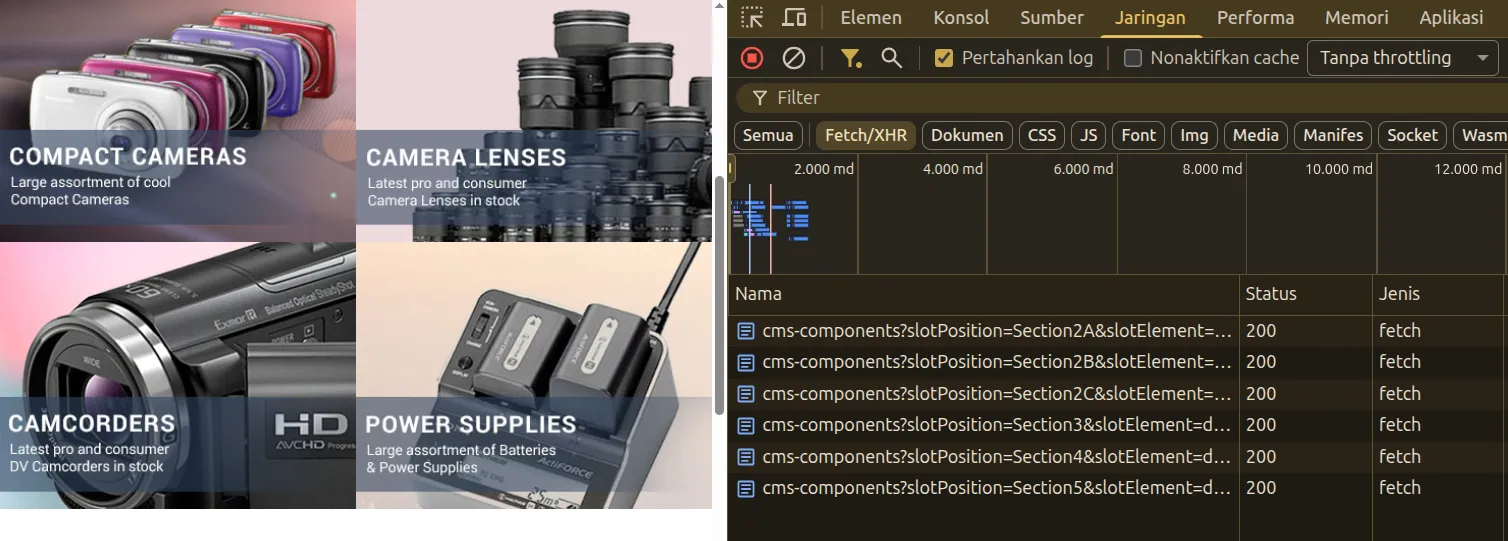 Chrome network tab, showing multiple fetch to /cms-components
 -
Why the dummy element is important: without it, the element would have no height where the components should be, causing a layout shift (CLS) when the component loads. The placeholder element reserves space and can show a loading indicator to the user.
If we didn't add styling to placeholder, the page would look like this:
 Homepage with dummy element that have no styling, the page looks short
It's not good right? The page looks short, the user won't know there would be components showing under the banner, the user will have no incentive to scroll.
For this test let's just add simple CSS, you can add animation or some better styling later:
 .lazy-loading-placeholder {
     min-height: 50px;
     max-width: 99%;
     margin: 3px;
     background: #dbcccc;
     display: flex;
     align-items: center;
     justify-content: center;
 }
Now the result is:
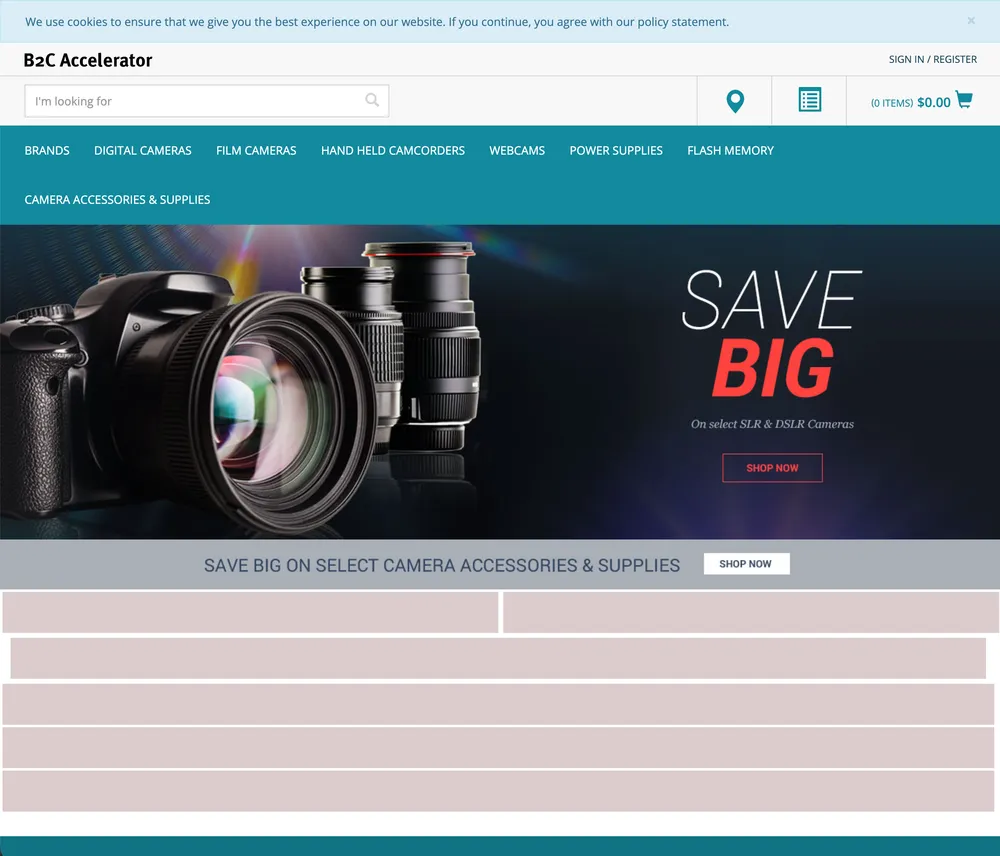 Homepage with dummy element that have styling, the page indicate that some elements are not yet loaded
Now the user know that there's some components that will be loaded later.
-
Now, let's also test smartedit, since it's important parts to manage contents.
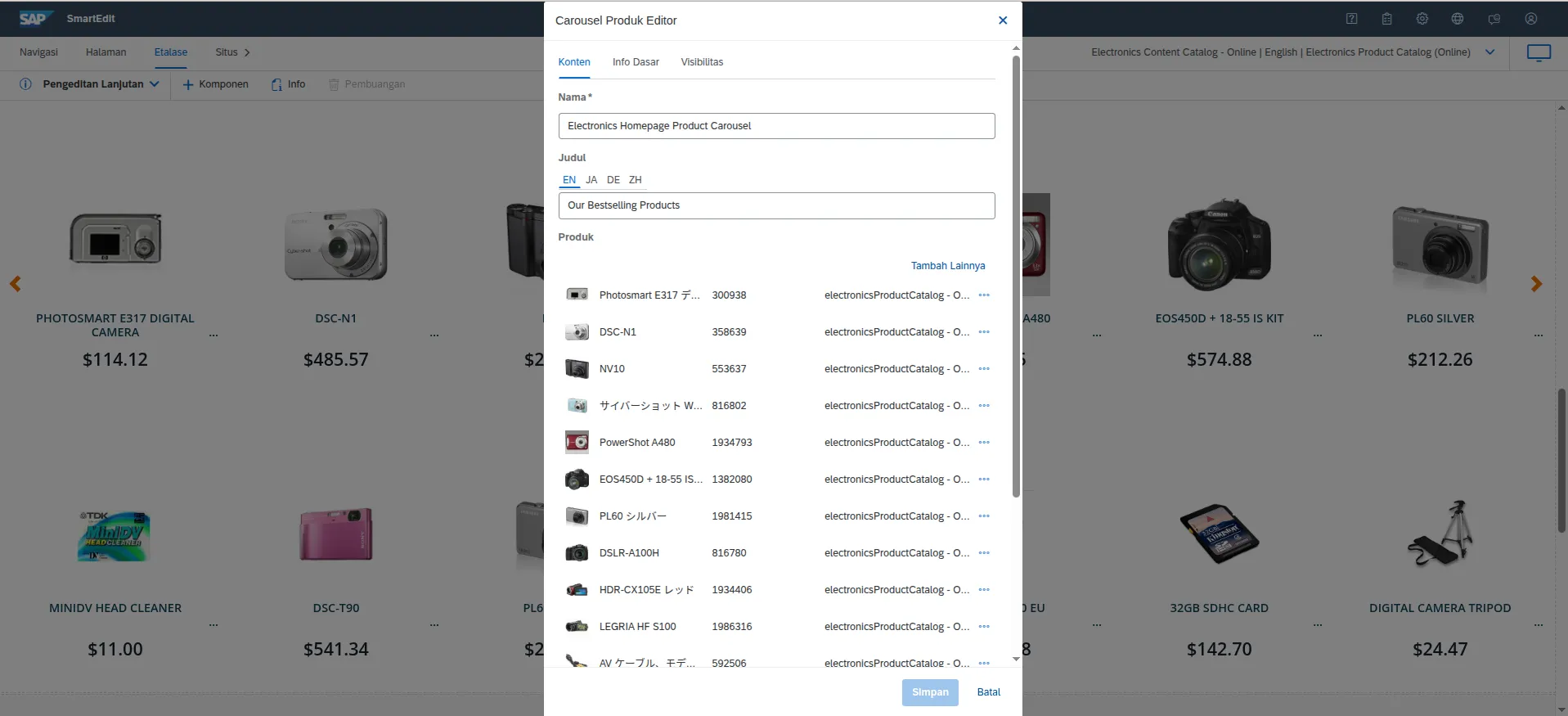 Smartedit still works after implementing component lazy load
As you can see from the screenshot, smartedit still works.
Also same as when accessing storefront directly, the components will be lazy loaded and will be loaded as you scroll through the page.
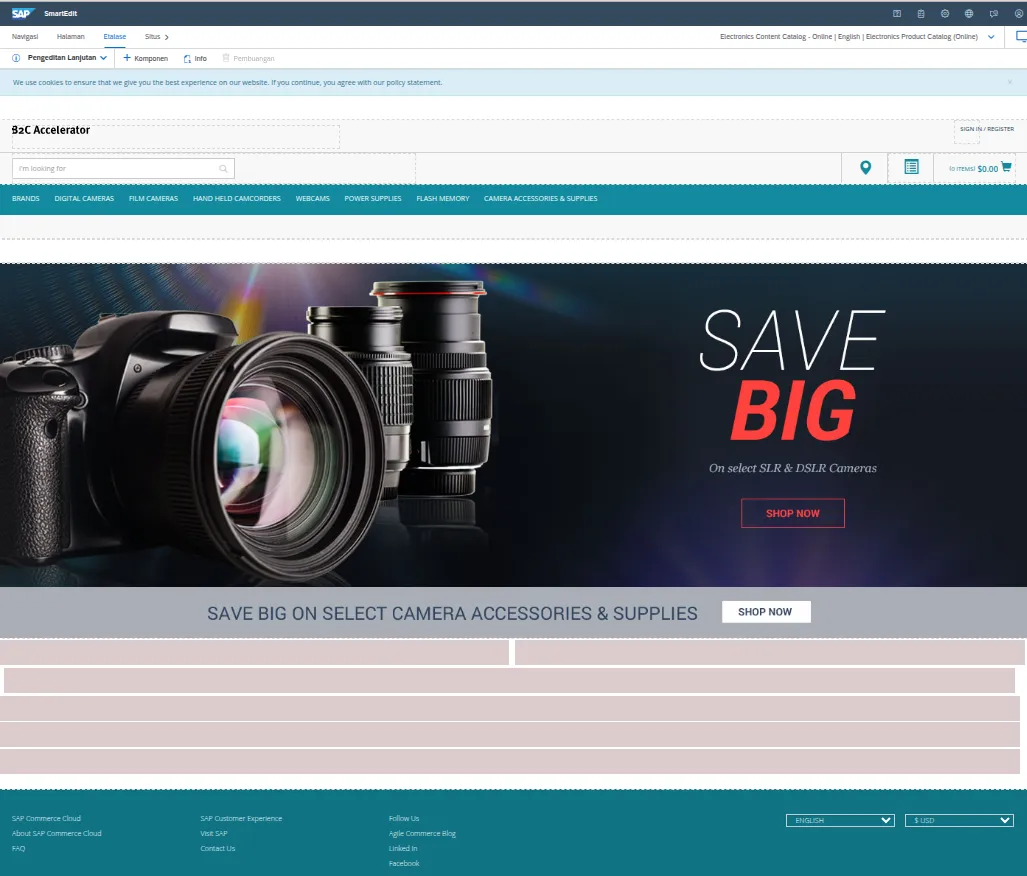 Lazy loaded component on smartedit
Result
The initial page load is faster because only the components visible in the viewport are rendered server-side. Off-screen components are loaded on demand via Ajax as the user scrolls.
Before lazy load:
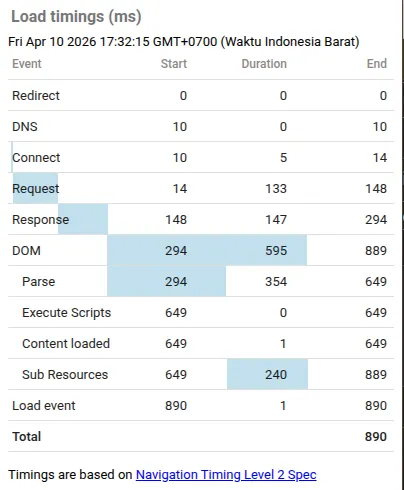 Page load time before implementing component lazy load showing 890ms, taken from Page Load Time Google Chrome's extension
After lazy load:
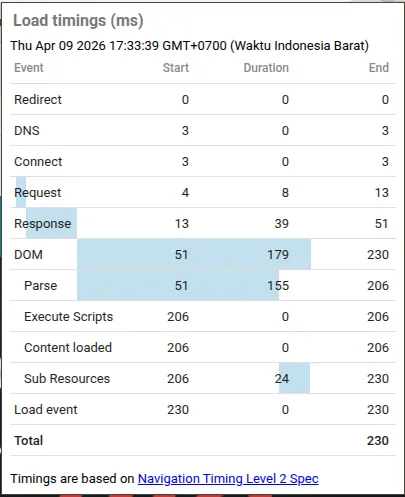 Page load time after implementing component lazy load showing 230ms, taken from Page Load Time Google Chrome's extension
Conclusion
Lazy loading off-screen components can improve your JSP-based accelerator storefront's performance. Of course there's option to decopled and migrate the storefront to modern front-end, but this can helps if you're stuck with the old accelerator, like I did.
Even in theory, someone with enough spare time could build SPA using this method, but that requires a lot of works.
Credits
This implementation is inspired by Rauf Aliev's article on Angular2 and Hybris integration, adapted for the JSP-based Accelerator Storefront.